<?xml version="1.0" encoding="utf-8"?>
<feed xmlns="http://www.w3.org/2005/Atom">
  <title>A14M</title>
  <subtitle>Chartered Chemical Engineer, Process Control Engineer, Scout Leader</subtitle>
  <link href="https://www.a14m.uk/feed" rel="self"/>
  <link href="https://www.a14m.uk/"/>
  <updated>2026-05-26T20:58:00.000Z</updated>
  <id>https://www.a14m.uk/</id>
  <author>
    <name>Alistair Marshall</name>
  </author>
  <entry>
    <title>Edinburgh Marathon Race Report</title>
    <link href="https://www.a14m.uk/2026/05/edinburgh-marathon-race-report/"/>
    <updated>2026-05-26T20:58:00.000Z</updated>
    <id>https://www.a14m.uk/2026/05/edinburgh-marathon-race-report/</id>
    <content type="html"><![CDATA[
      <p>Last Sunday, I ran the Edinburgh Marathon. This was my first official marathon, which sounds odd given that I had already run three ultramarathons and done two training runs above 50km. The gap in my running CV between 42km and 50km had been entirely deliberate.</p>
<p>The reasoning was simple. If I were to enter a marathon, I would want to race it for a good time. The ultras, by contrast, were always about finishing. Two very different mindsets, and I had not been ready to commit to the first one. Until now.</p>
<h2>Race Run Through</h2>
<h3>Pre-Race</h3>
<p>My initial plan was to take the train through to the start. Last year there were reports of trains being full and runners missing the start of the race, so I thought I would just take an earlier train. Except this is Scotland on a Sunday, and the early trains don’t exist. My next idea was to drive to a park-and-ride, but that had the obvious problem of needing to drive home afterwards. Luckily my dad offered to give me a lift in, which took all the pressure off.</p>
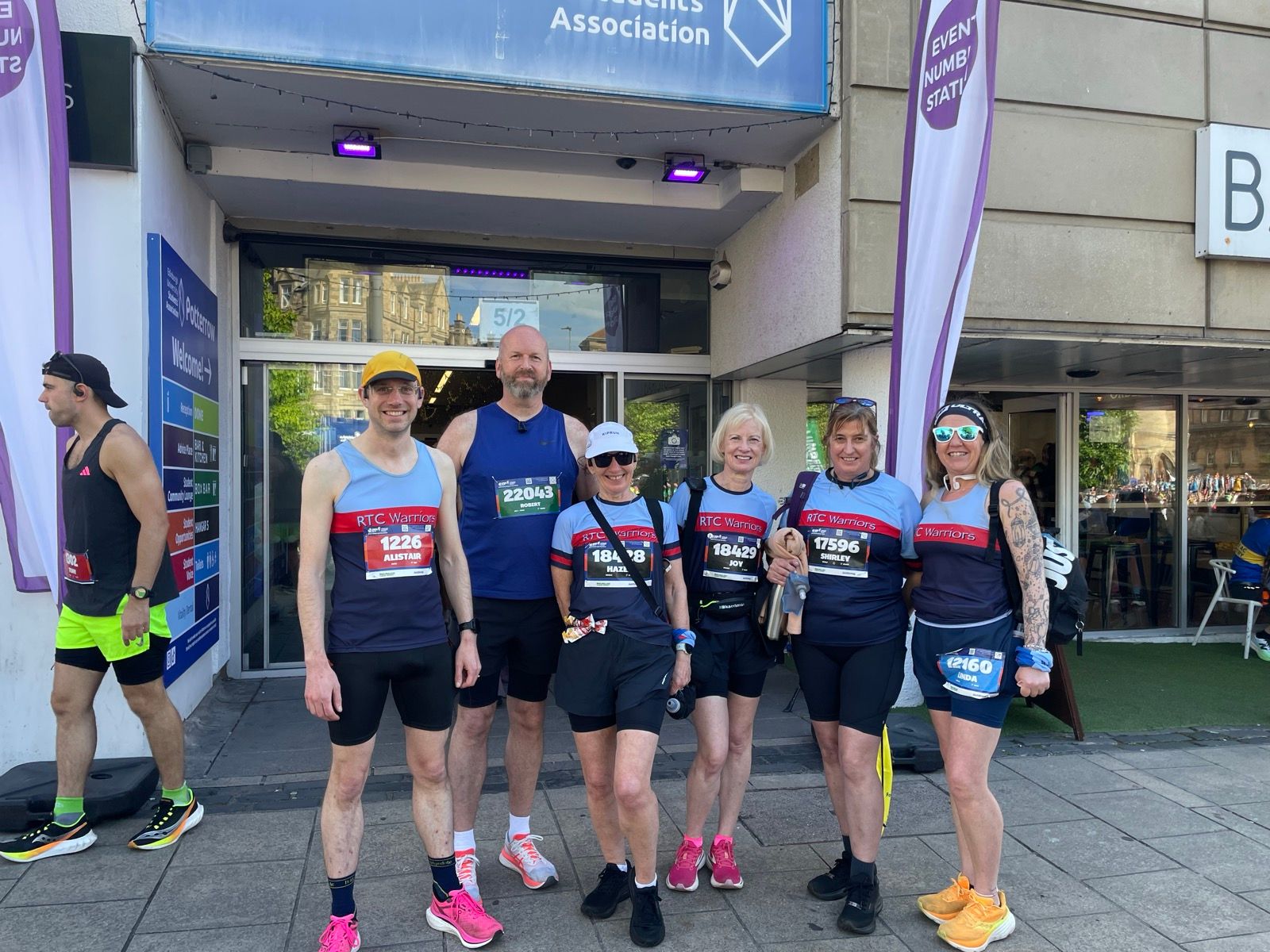
<p>After being dropped off, I made my way to the start area, dropped my bag off and headed towards the start pens. On the way I bumped into some of the other RTC Warriors, so we had a quick chat and got a group photo.</p>
<p>I would be lying to say I had no nerves, but it certainly wasn’t as bad as some of the previous races.</p>
<figure class="imgcontainer"><img src="/images/2026/ed_marathon_start.jpg" alt="Alistair among a group of other RTC Warriors'" title="Ready to go"><figcaption class="caption">Ready to go</figcaption></figure>
<div style="clear:both;"></div>
<h3>The First Few Miles</h3>
<p>Within the first two miles, a bead of sweat dripped down the inside of my glasses. That was the moment I realised the time I had been chasing was not going to happen. It was simply too hot.</p>
<p>I pushed on to see what I could achieve. By Portobello I had given up looking at my pace and was just focusing on running in a controlled manner. There was no point in burning myself out chasing a number that was no longer realistic.</p>
<h3>Portobello and Beyond</h3>
<p>The crowds were brilliant. The cheering and the placards genuinely lifted me, even when the support was clearly aimed at someone else. What I had not expected was the personal cheering - “Come on Alistair!”, “Well done Alistair!” - from complete strangers. The first few times I tried to work out if I should recognise them, before remembering that they print your name on the race number.</p>
<p>Somewhere along the coast I caught up with the tail runners from the half marathon. It was around this point that I started noticing ambulances and medics moving about the course. The course was very exposed and there were few opportunities to hide from the sun.</p>
<h3>Survival Mode</h3>
<p>At the far point of the course, I changed plan and shifted into survival mode. I had just passed someone collapsed at the side of the road receiving medical attention, and I made a firm decision that I was not going to let that happen to me.</p>
<p>From then on, at each water station, I ran into the station, took the water, then walked with it until the bottle was completely empty. No wasted water, no rushing through. I was going to give myself the best possible chance of getting to the finish in one piece.</p>
<p>The temptation to slow to a jog, or even just walk, was strong. But I gave myself a rule: if I had a water bottle with water still in it, I could walk. Otherwise, I had to run. That kept me honest between the stations.</p>
<h3>The “Sprint” Finish</h3>
<p>I still had a sprint finish in me. Unfortunately, I misjudged where the finish actually was. What I had intended as a 100m sprint turned into something closer to 500m.</p>
<p>Once I crossed the line, my blood pressure presumably crashed and I found it very difficult to balance. One of the first aiders pulled me aside, sat me down and made me drink some water. After a bit, I was keen to get out of the finish area and find my dad. I did my best to stagger in a straight line through the finish funnel, picking up my t-shirt and goody bag while trying not to look like I had had several drinks too many.</p>
<figure class="imgcontainer"><img src="/images/2026/ed_marathon_end.jpg" alt="Alistair standing with his medal" title="Finished"><figcaption class="caption">Finished</figcaption></figure>
<div style="clear:both;"></div>
<p><a href="https://www.strava.com/activities/18634442011">Strava Activity</a></p>
<h2>Reflection</h2>
<h2>Reflection</h2>
<p>I am not a fan of this distance.</p>
<p>I didn’t get the time I wanted, but I am not particularly keen to try again. The time commitment to train properly for a marathon is significant, and the race itself takes a lot out of the body. What I really enjoy about running is the training, and the feeling of being fit. Between the taper before the race and the recovery afterwards, these big events rob me of that feeling for several weeks at a time.</p>
<p>If I am being honest, I feel the same way about the ultras. I like the idea of them. I enjoy thinking back to them. But the actual doing of them is pretty miserable at the time, and the missed training weeks are just as frustrating. There is a pattern here that I should probably pay more attention to.</p>
<p>Hopefully I can recover quickly from this one and get back to running properly.</p>

    ]]></content>
    <category term="Running"/>
    <category term="Personal"/>
    <category term="Race Report"/>
  </entry>
  <entry>
    <title>More Home Assistant Automations</title>
    <link href="https://www.a14m.uk/2026/02/more-home-assistant-automations/"/>
    <updated>2026-02-17T11:46:00.000Z</updated>
    <id>https://www.a14m.uk/2026/02/more-home-assistant-automations/</id>
    <content type="html"><![CDATA[
      <p>Following on from my <a href="/2025/07/pizza-oven-alarm/">pizza oven alarm post</a>, I thought it was worth writing up some of the other home automations I have been running. Some of these have been in place for years, others are more recent additions. A few rely on <a href="https://www.macrodroid.com/">MacroDroid</a> — an Android automation app — working in tandem with Home Assistant via webhooks.</p>
<h2>Arriving Home After Dark</h2>
<p>When I arrive home after dark, the front door lights turn on at full brightness for ten minutes, then automatically switch off again.</p>
<p>Home Assistant does have its own presence detection, but I found it was too slow — often I would already be in the house by the time it registered that I had arrived. Using MacroDroid on the phone gives a much faster response, because it can combine two triggers: entering a GPS geofence around the house, or connecting to the home Wi-Fi network. Either one will fire the macro. The combination means it typically triggers before I have even reached the driveway.</p>
<p>Before doing anything, the macro checks two conditions. First, it must be after sunset — no point turning on lights in daylight. Second, a stopwatch that resets each time the macro fires must have been running for at least eight minutes. That second check prevents repeated triggering if the phone briefly drops off the Wi-Fi and reconnects, or drifts in and out of the geofence boundary.</p>
<p>If both conditions are satisfied, the macro makes an HTTP PUT request to a Home Assistant webhook. On the HA side, this triggers an automation that turns on the front door lights at full brightness and starts a ten-minute timer. When the timer finishes, a second automation turns the lights back off.</p>
<p>There is also a “leaving home” automation that turns off the lights when both adults have left the home zone, so there is no risk of them being left on all day.</p>
<p>The MacroDroid-to-HA webhook pattern is something I use in a few places. It lets me use the phone’s location and connectivity awareness — things MacroDroid handles very well — whilst leaving the actual smart home control to Home Assistant.</p>
<p><strong>MacroDroid macro:</strong> The triggers are “Enter geofence: Home” and “Wi-Fi SSID in range: [your home SSIDs]”. The constraints are “After sunset” and “Stopwatch ‘Got home’ &gt; 8 minutes”. The actions reset the stopwatch then make an HTTP PUT to the HA webhook URL.</p>
<p><strong>Home Assistant automations:</strong></p>
<pre><code class="language-yaml"># Turn on front door lights when arriving home after dark
- alias: Arrived Home After Dark
  triggers:
    - trigger: webhook
      webhook_id: &quot;arrived-home-after-dark&quot;
      allowed_methods: [PUT]
  actions:
    - action: light.turn_on
      target:
        area_id: front_door
      data:
        brightness_pct: 100
    - action: timer.start
      target:
        entity_id: timer.arrived_home
      data:
        duration: &quot;00:10:00&quot;

# Turn lights off when the timer finishes
- alias: Arrived Home Complete
  triggers:
    - trigger: event
      event_type: timer.finished
      event_data:
        entity_id: timer.arrived_home
  actions:
    - action: light.turn_off
      target:
        area_id: front_door

# Turn off front door lights when everyone has left the house
- alias: Leaving Home
  triggers:
    - trigger: zone
      entity_id: person.adult_1
      zone: zone.home
      event: leave
    - trigger: zone
      entity_id: person.adult_2
      zone: zone.home
      event: leave
  conditions:
    - condition: not
      conditions:
        - condition: zone
          entity_id: person.adult_1
          zone: zone.home
    - condition: not
      conditions:
        - condition: zone
          entity_id: person.adult_2
          zone: zone.home
  actions:
    - action: light.turn_off
      target:
        area_id: front_door
</code></pre>
<h2>Children’s Bedroom Lights</h2>
<p>Both children have loft beds with bright LED strips underneath. The LEDs are wired via smart switches that Home Assistant can control, but the only physical remote in each room is for the main ceiling light.</p>
<p>Rather than fitting extra remotes or switches, I set up automations that follow the main light’s brightness. When the main light is turned up above a high brightness threshold, the under-bed LEDs switch on. When the main light drops below a lower threshold — or is turned off entirely — they switch off. The gap between the two thresholds acts as a deadband, preventing the LEDs from flickering while someone is slowly adjusting the brightness.</p>
<p>The end result is that one remote effectively controls both the overhead light and the under-bed task lighting, without the children needing to think about it at all.</p>
<pre><code class="language-yaml"># Example for one child's room — repeat with different entities for the other
- alias: Set Child Bedroom Under-Bed Light
  triggers:
    - trigger: state
      entity_id: light.bedroom_main_light
      attribute: brightness
    - trigger: state
      entity_id: light.bedroom_main_light
  actions:
    - choose:
        - conditions:
            - condition: numeric_state
              entity_id: light.bedroom_main_light
              attribute: brightness
              above: 190
          sequence:
            - action: light.turn_on
              target:
                entity_id: light.bedroom_under_bed
        - conditions:
            - condition: or
              conditions:
                - condition: numeric_state
                  entity_id: light.bedroom_main_light
                  attribute: brightness
                  below: 100
                - condition: state
                  entity_id: light.bedroom_main_light
                  state:
                    - &quot;off&quot;
                    - unavailable
                    - unknown
          sequence:
            - action: light.turn_off
              target:
                entity_id: light.bedroom_under_bed
</code></pre>
<p>Note that HA represents brightness on a scale of 0–255, so <code>above: 190</code> corresponds to roughly 75% brightness and <code>below: 100</code> to roughly 40%.</p>
<h2>The TV</h2>
<h3>Sharing Links from the Phone</h3>
<p>One of my favourite automations is being able to share a link from my phone directly to the living room TV.</p>
<p>Home Assistant’s companion app registers itself as a share target on Android. When you share a URL to it, HA fires a <code>mobile_app.share</code> event containing the URL. An automation picks this up and checks whether the URL is a YouTube link using a regular expression. If it is, it extracts the video ID and launches the YouTube app on the TV at that specific video, rather than opening a browser. If the URL is not a YouTube link, it opens the TV’s built-in browser at that address instead.</p>
<p>The TV has a kids lock enabled, which requires a PIN before content will play. A parallel sequence handles this automatically: two seconds after launching the app (to give it time to open and show the PIN prompt), it sends the PIN digits as individual button presses to the TV, followed by Enter.</p>
<p>The whole thing means I can be reading something on my phone, tap Share, select Home Assistant, and it is playing on the TV within a few seconds.</p>
<pre><code class="language-yaml">- alias: Share to TV
  triggers:
    - trigger: event
      event_type: mobile_app.share
  actions:
    - if:
        - condition: template
          value_template: &gt;
            {{ trigger.event.data.url | regex_match(
              '^(?:https?:\/\/)?(?:www\.|m\.)?(?:youtube\.com\/(?:watch\?v=|shorts\/)|youtu\.be\/)([0-9A-Za-z_-]{11}).*'
            ) }}
      then:
        - variables:
            vID: &gt;
              {{ trigger.event.data.url | regex_replace(
                '^(?:https?:\/\/)?(?:www\.|m\.)?(?:youtube\.com\/(?:watch\?v=|shorts\/)|youtu\.be\/)([0-9A-Za-z_-]{11}).*$',
                'v=\1'
              ) }}
        - parallel:
            - action: webostv.command
              data:
                entity_id: media_player.living_room_tv
                command: system.launcher/launch
                payload:
                  id: youtube.leanback.v4
                  contentId: &quot;{{ vID }}&quot;
            - sequence:
                - delay: &quot;00:00:02&quot;
                - action: webostv.button
                  data:
                    entity_id: media_player.living_room_tv
                    button: &quot;1&quot;  # Replace these four digits with your PIN
                - action: webostv.button
                  data:
                    entity_id: media_player.living_room_tv
                    button: &quot;2&quot;
                - action: webostv.button
                  data:
                    entity_id: media_player.living_room_tv
                    button: &quot;3&quot;
                - action: webostv.button
                  data:
                    entity_id: media_player.living_room_tv
                    button: &quot;4&quot;
                - action: webostv.button
                  data:
                    entity_id: media_player.living_room_tv
                    button: ENTER
      else:
        - parallel:
            - action: webostv.command
              data:
                entity_id: media_player.living_room_tv
                command: system.launcher/open
                payload:
                  target: &quot;{{ trigger.event.data.url }}&quot;
            - sequence:
                - delay: &quot;00:00:02&quot;
                - action: webostv.button
                  data:
                    entity_id: media_player.living_room_tv
                    button: &quot;1&quot;
                - action: webostv.button
                  data:
                    entity_id: media_player.living_room_tv
                    button: &quot;2&quot;
                - action: webostv.button
                  data:
                    entity_id: media_player.living_room_tv
                    button: &quot;3&quot;
                - action: webostv.button
                  data:
                    entity_id: media_player.living_room_tv
                    button: &quot;4&quot;
                - action: webostv.button
                  data:
                    entity_id: media_player.living_room_tv
                    button: ENTER
</code></pre>
<h3>Notification When the TV Is Turned On</h3>
<p>This one started as a parenting tool. When the TV is turned on, Home Assistant sends a notification to any adult who is currently at home, telling them what time it came on and offering a “Turn Off” button. The check for whether each adult is home is there to avoid spamming someone who is out at work with notifications they cannot act on. Tapping the button fires a separate automation that turns the TV off via the media player integration.</p>
<p>The idea was to make it obvious to the children that we would always know if they had turned the TV on without permission. These days they are well aware the notification exists, which is arguably just as effective as it ever was.</p>
<pre><code class="language-yaml">- alias: TV Is On
  triggers:
    - trigger: device
      device_id: your_tv_device_id
      domain: media_player
      type: turned_on
  actions:
    - if:
        - condition: zone
          entity_id: person.adult_1
          zone: zone.home
      then:
        - action: notify.mobile_app_adult_1_phone
          data:
            title: TV is on
            message: &quot;Someone turned on the TV at {{ now().strftime('%H:%M') }}&quot;
            data:
              notification_icon: mdi:television
              actions:
                - action: TURN_OFF_TV
                  title: Turn Off
    - if:
        - condition: zone
          entity_id: person.adult_2
          zone: zone.home
      then:
        - action: notify.mobile_app_adult_2_phone
          data:
            title: TV is on
            message: &quot;Someone turned on the TV at {{ now().strftime('%H:%M') }}&quot;
            data:
              notification_icon: mdi:television
              actions:
                - action: TURN_OFF_TV
                  title: Turn Off

- alias: Turn Off TV via Notification
  triggers:
    - trigger: event
      event_type: mobile_app_notification_action
      event_data:
        action: TURN_OFF_TV
  actions:
    - action: media_player.turn_off
      target:
        entity_id: media_player.living_room_tv
</code></pre>
<h2>Bluetooth Headphone Battery in Home Assistant</h2>
<p>Home Assistant does a good job of tracking battery levels for devices — mobile phones, sensors, remote controls — but Bluetooth audio devices are a notable gap. There is no standard way for the Home Assistant mobile companion app to poll the battery level of a connected headset.</p>
<p>The solution uses MacroDroid on the phone. Android broadcasts a system intent (<code>android.bluetooth.device.action.BATTERY_LEVEL_CHANGED</code>) whenever a connected Bluetooth device reports a change in its battery level. MacroDroid can listen for system intents and extract values from the broadcast extras — in this case, the <code>BATTERY_LEVEL</code> extra is stored in a local variable.</p>
<p>The macro then POSTs that value as JSON to a Home Assistant webhook, but only when the value is not <code>-1</code>. Android uses <code>-1</code> to indicate that the battery level is unknown or unavailable, so that constraint prevents spurious updates reaching HA.</p>
<p>On the Home Assistant side, the webhook automation reads the <code>battery_level</code> field from the JSON payload and writes it into an <code>input_number</code> helper. From there it appears on the dashboard alongside every other battery sensor.</p>
<p><strong>MacroDroid macro:</strong> Trigger is “Intent received: <code>android.bluetooth.device.action.BATTERY_LEVEL_CHANGED</code>”, with the <code>android.bluetooth.device.extra.BATTERY_LEVEL</code> extra mapped to a local variable (e.g. <code>bt_batt</code>). The single action is an HTTP POST to the HA webhook with body <code>{&quot;battery_level&quot;: {lv=bt_batt}}</code>, with a constraint that <code>bt_batt != -1</code>.</p>
<p><strong>Home Assistant — helper and automation:</strong></p>
<p>First, create an <code>input_number</code> helper for the battery level (this can also be done via the UI under Settings → Helpers):</p>
<pre><code class="language-yaml">input_number:
  headphone_battery:
    name: Headphone Battery
    min: 0
    max: 100
    step: 1
    unit_of_measurement: &quot;%&quot;
    icon: mdi:headphones
</code></pre>
<p>Then the automation to receive updates from the webhook:</p>
<pre><code class="language-yaml">- alias: Update Headphone Battery
  triggers:
    - trigger: webhook
      webhook_id: &quot;headphone-battery-update&quot;
      allowed_methods: [POST]
  actions:
    - action: input_number.set_value
      target:
        entity_id: input_number.headphone_battery
      data:
        value: &quot;{{ trigger.json.battery_level }}&quot;
</code></pre>
<p>I have many other simple automations for example turning lights on and off at set times, but the ones listed here are the more interesting ones I thought it would be worth sharing. I hope this can be of help or inspiration to someone else.</p>

    ]]></content>
    <category term="Family"/>
    <category term="Personal"/>
    <category term="Home Automation"/>
  </entry>
  <entry>
    <title>Firetoys TechPro Cathedral Fire Poi</title>
    <link href="https://www.a14m.uk/2026/01/cathedral-poi-review/"/>
    <updated>2026-01-10T20:14:00.000Z</updated>
    <id>https://www.a14m.uk/2026/01/cathedral-poi-review/</id>
    <content type="html"><![CDATA[
      <h2>An amazing upgrade over the basic set</h2>
<p>I’ve been fire spinning for just under a year. After my first time spinning with fire, I immediately bought a set of <a href="https://cascadejuggling.com/products/cascade-50mm-fire-poi">basic fire poi</a> for under £20. These were nice enough as a starter set, allowing me to spin at occasions other than the fire clubs of nearby cities. But as my skills developed, their limitations became apparent.</p>
<h2>The problems with my starter set</h2>
<p>My first issue was that the heads were small and, when combined with the chains, meant that not much weight was at the end. This made spinning feel different from my homemade practice poi, adding an extra hazard to be aware of.</p>
<p>I also found that as my skills improved and I was able to perform a wider variety of tricks, the burn time became annoyingly short. I’d run out of fuel before I’d run out of performance.</p>
<h2>Enter the TechPro Cathedral</h2>
<p>The <a href="https://www.firetoys.co.uk/products/firetoys-techpro-cathedral-fire-poi">Firetoys TechPro Cathedral Fire Poi</a> are a significant improvement. At around £70 they’re a considerably higher investment than my starter set—probably too much if you’re not sure fire spinning is for you—but I’m delighted I made the upgrade.</p>
<p>The technora cords are lovely and, combined with the heavier heads, mean they behave much more like my practice poi. I’ve found performing tricks much smoother and easier than before. There’s a small section of chain between the head and the technora rope, which is great at letting the heads get dipped into the fuel whilst keeping the fuel off the rope. The chain is long enough to maintain this separation, but short enough not to interfere with the weight distribution or feel of the poi.</p>
<p>The heavier heads don’t feel burdensome—the lack of chains elsewhere actually helps—and I really like the extra weight at the business end.</p>
<p>It’s disappointing how few fire poi are sold with technora from UK suppliers. Even Firetoys seem to sell many more sets with chains rather than rope. I think rope should be the default, possibly with some “budget friendly” chain options for those who want them.</p>
<h2>Cathedral flames</h2>
<p>The wicks are much larger as well. I’m enjoying the bigger flames and louder roars, though I suspect these would have been quite intimidating for my first few spins. My wife commented on how much brighter the flames were and that they lit up my face better.</p>
<p>I didn’t test the maximum burn time because I ended the burn early using a fire blanket, but it was long enough for me to go through all the tricks I’m currently confident to perform—a marked improvement over my previous set.</p>
<h2>Nice touches</h2>
<p>The glow-in-the-dark handles are also a nice addition. I prefer holding them over the finger loops and, while I’m not yet ready to start tossing the poi, it’s nice to know that the equipment I have is capable when I am.</p>
<h2>One minor inconvenience</h2>
<p>My main issue with the new poi isn’t a fault of the poi themselves, but of my setup. I had a small paint tin and fuel container that worked nicely for the old small-headed poi, but the cathedral heads are much larger and don’t fit my existing setup. I need to source larger dipping and fuel storage containers.</p>
<h2>Verdict</h2>
<p>These are an excellent upgrade. The technora cords, heavier heads, and larger wicks have made spinning more enjoyable and my performances more confident. If you’re past the beginner stage and ready to invest in better equipment, I’d thoroughly recommend them.</p>

    ]]></content>
    <category term="Fire Poi"/>
    <category term="Review"/>
  </entry>
  <entry>
    <title>Farewell Grangemouth</title>
    <link href="https://www.a14m.uk/2025/12/farewell-grangemouth/"/>
    <updated>2025-12-19T16:12:00.000Z</updated>
    <id>https://www.a14m.uk/2025/12/farewell-grangemouth/</id>
    <content type="html"><![CDATA[
      <p>Today marks my final day working at Grangemouth refinery. Though I’m not entirely sure how true that statement is, considering we stopped refining oil earlier this year. I’ve been working on transitioning the site to an import oil terminal.</p>
<p>Lots of people have asked how I feel, and to be honest, there wasn’t much I was feeling at first.</p>
<p>There were occasions when it started to feel real. Emptying out the lockers and drawers. Bringing my books and course notes home. Saying goodbye to the various shifts, each time knowing it was the last time I would see them.</p>
<p>I think the sheer amount of work I was attempting to get done in the last few weeks kept me from truly thinking about it. Even within the last hour before leaving, I was still updating documentation and trying to complete one last job to make life easier for those staying behind a bit longer.</p>
<p>But that changed once I got home.</p>
<p>While I am sad, my overwhelming emotion is one of gratitude. I have been very lucky these last 14 years. Lucky that I have somewhere to go to immediately. I’ve definitely matured during my time at Grangemouth and learnt a lot along the way. Thanks to everyone who has helped me along the way.</p>
<p><img src="/images/2025/refinery.jpg" alt="Grangemouth Refinery"></p>

    ]]></content>
    <category term="Work"/>
  </entry>
  <entry>
    <title>Pizza Oven Alarm</title>
    <link href="https://www.a14m.uk/2025/07/pizza-oven-alarm/"/>
    <updated>2025-07-30T19:09:00.000Z</updated>
    <id>https://www.a14m.uk/2025/07/pizza-oven-alarm/</id>
    <content type="html"><![CDATA[
      <p>We’ve had our <a href="https://www.a14m.uk/2018/12/we-have-a-pizza-oven/">Ooni 3 pizza oven</a> since 2018 - back when the company was still called “uuni” and before they completed their rebranding. We use it almost every week, running it on gas rather than wood pellets, and it’s been brilliant. Well, mostly…</p>
<p>The problem is that strong winds we experiance have a tendency to blow out the gas flame. Not only can this be dangerous, but it’s also incredibly frustrating to discover that the stone has gone completely cold by the time I’ve noticed. This has been bothering me for quite some time, but I have finally got around to doing something about it.</p>
<h2>The Problem</h2>
<p>I wanted a reliable flame detection method to warn me before everything cooled down.</p>
<p>I have now wired up a thermocouple and connected this to my home-assistant to create an automated monitoring system.</p>
<h2>The Hardware</h2>
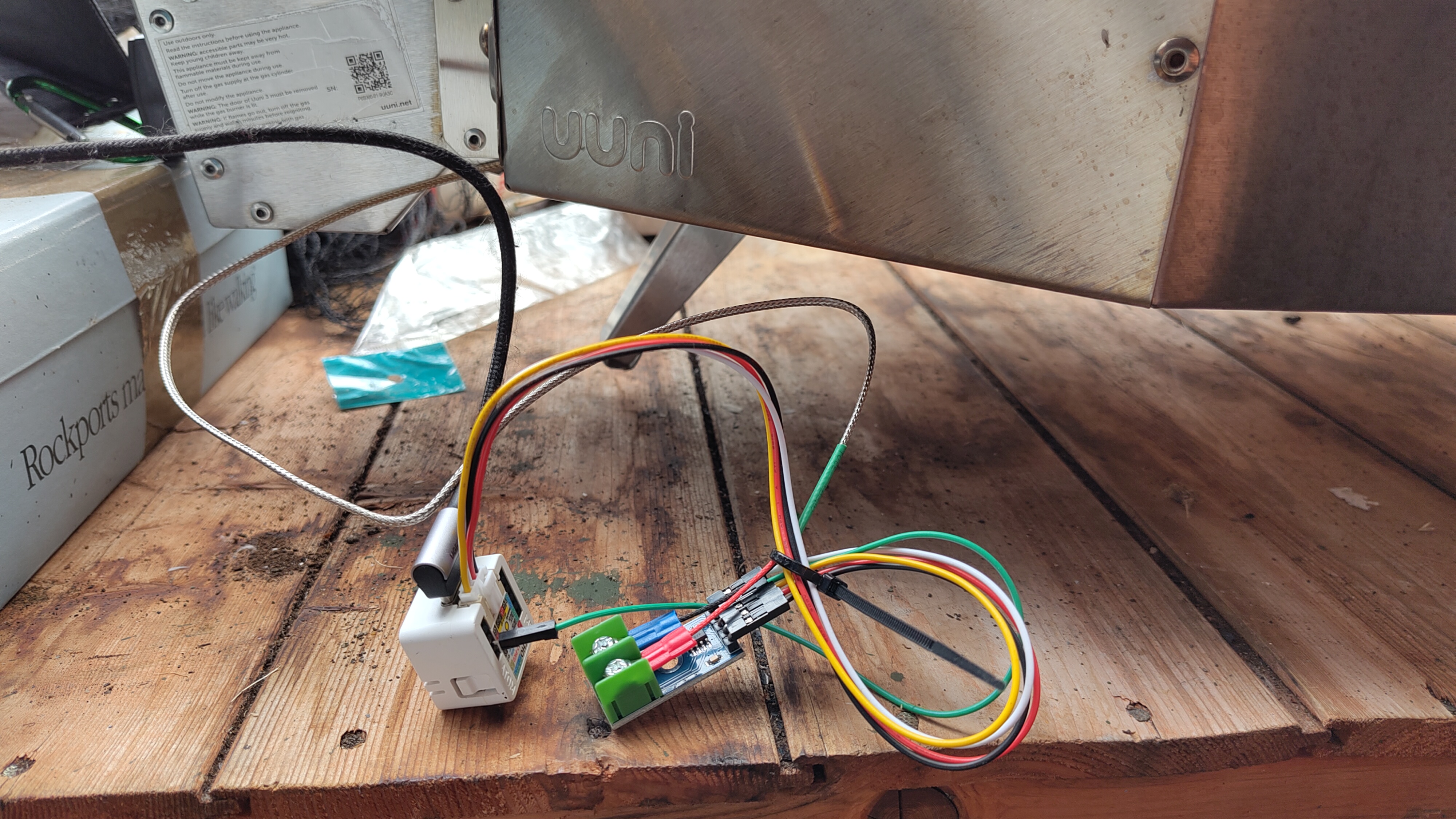
<p>I had an unused <a href="https://docs.m5stack.com/en/atom/atomecho">M5Stack Atom Echo</a> lying about, which I hoped would be suitable for the job. I paired it with a K-type thermocouple from Amazon - a temperature probe that can handle the high temperatures inside a pizza oven.</p>
<figure class="imgcontainer"><img src="/images/2025/temperature-probe.jpg" alt="A mess of wires at the back of a pizza oven" title="Messy Wires"><figcaption class="caption">Messy Wires</figcaption></figure>
<p>The wiring was mostly straightforward, though the Grove connector only has 4 pins and the MAX6675 requires 5. This meant I had to run an extra wire directly into the back of the Echo, which is a bit of a pain as it comes out at an odd angle compared to all the other wires. I connected the thermocouple to the MAX6675 amplifier board that came with the thermocouple I bought, then wired that to the Atom Echo.</p>
<p>I tucked the thermocouple probe into the back of the oven where it wouldn’t get in the way, and left the electronics safely outside. I am not measuring the stone temperature, or any other particular temperature, but close enough to the flame that I should see any changes quickly should the flame go out.</p>
<div style="clear:both;"></div>
<p>Here is the yaml configuration I added to the atom echo in the ESPHome Device Builder:</p>
<pre><code class="language-yaml"># SPI configuration for MAX6675 temperature sensor
spi:
  clk_pin: GPIO32  # Grove SCL pin
  miso_pin: GPIO26 # Grove SDA pin

# Temperature sensor
sensor:
  - platform: max6675
    name: &quot;Pizza Oven Temperature&quot;
    cs_pin: GPIO25   # Spare pin - needs wire access
    update_interval: 5s
    unit_of_measurement: &quot;°C&quot;
    accuracy_decimals: 1
    filters:
      - median:
          window_size: 5
          send_every: 5
</code></pre>
<h2>The Data</h2>
<p>Here’s what an evening of pizza-making looks like in numbers:</p>
<p><img src="/images/2025/pizza-oven-trend.jpg" alt="Pizza Oven Temperature Graph"></p>
<p>The graph shows the temperature throughout the evening. You can see the initial heating phase as the gas flame gets the oven up to temperature, reaching about 350°C. I suspect the brief gap in data when the oven was up to temperature was caused by my USB power bank going to sleep. There is some variation in temperature for most of the cooking period. Then there’s the dramatic drop when we finished cooking and turned the gas off.</p>
<p>With this data, I think I would struggle to work out where to place an ‘alarm’ for detecting that the fire has gone out. During the heating, it spent all of the time above 300°C, but there was one point when the temperature dropped close to that temperature (when the oven door was open and there was a short sudden downpour of rain). I suspect if I set my alarm at 300°C, It would be susceptible to spurious alarms, as well as taking some time before triggering during a genuine flame out.</p>
<p>Luckily home assistant makes it easy to track a derivative value, in this case rate of change of temperature:</p>
<p><img src="/images/2025/pizza-oven-trend-dt.jpg" alt="Pizza Oven Temperature Rate Graph"></p>
<p>In this case you can see four distinct dips where the door was opened to put pizzas in and take them out. The last dip is much more dramatic the final dip, much larger is the flame out. In this case, the drop is almost instant. If I set the alarm at -0.4°C/s, it should generate an alarm within a minute of the flame out, but hopefully not get triggered by normal fluctuations.</p>
<h2>The Fun Bit</h2>
<p>Once I had the temperature monitoring working, I couldn’t resist adding fun with the automation.</p>
<p>Now when I light the gas, my <a href="https://www.home-assistant.io/voice-pe/">Home Assistant voice</a> in the kitchen plays <a href="https://youtu.be/uZD8HKVKneI?t=202">“The Heat Is On” by Glenn Frey</a> from the Beverly Hills Cop soundtrack.</p>
<p>More importantly, when a flame-out occurs, it plays <a href="https://youtu.be/siQcRO8z7jY?t=61">“Fire’s Gone Out” by Chris Duarte Group</a>, in this case queued up to the words “I think this fire’s gone out” which seems perfect for the situation.</p>
<h2>Next Steps</h2>
<p>Now that I’ve got the basic monitoring working, there are a few practical improvements I need to make. I’ll need to monitor it a few more times and perhaps tweak the alarm limits or timing to avoid spurious alerts whilst also not missing any genuine flame-outs.</p>
<p>I also need to create a proper enclosure for the electronics to protect them from rain, ideally finding a way to mount it permanently - but it needs to be heat resistant since the oven surface gets really hot.</p>
<p>I may also need to find a better portable power supply or find a way to stop the USB power bank from going to sleep.</p>
<p>But for now, I’m quite pleased with my musical pizza oven alarm. It’s solved the original problem of not knowing when the gas had gone out, and it’s added a bit of theatre to our weekly pizza evenings.</p>

    ]]></content>
    <category term="Family"/>
    <category term="Personal"/>
    <category term="Cooking"/>
    <category term="Home Automation"/>
  </entry>
</feed>